Explore / Published stories & experiments
Follow a question. Find another possibility.
Three different arenas. One continuous curiosity. Choose a question, then move from reading to testing an idea yourself.
LJL / DECISION THEATRE
Your turn to make the call.
Take a Monday meeting brief. Choose a focus, open the evidence and decide what comes next. Then return to the original work and inspect the reasoning.
Let curiosity choose the route.
3 published stories
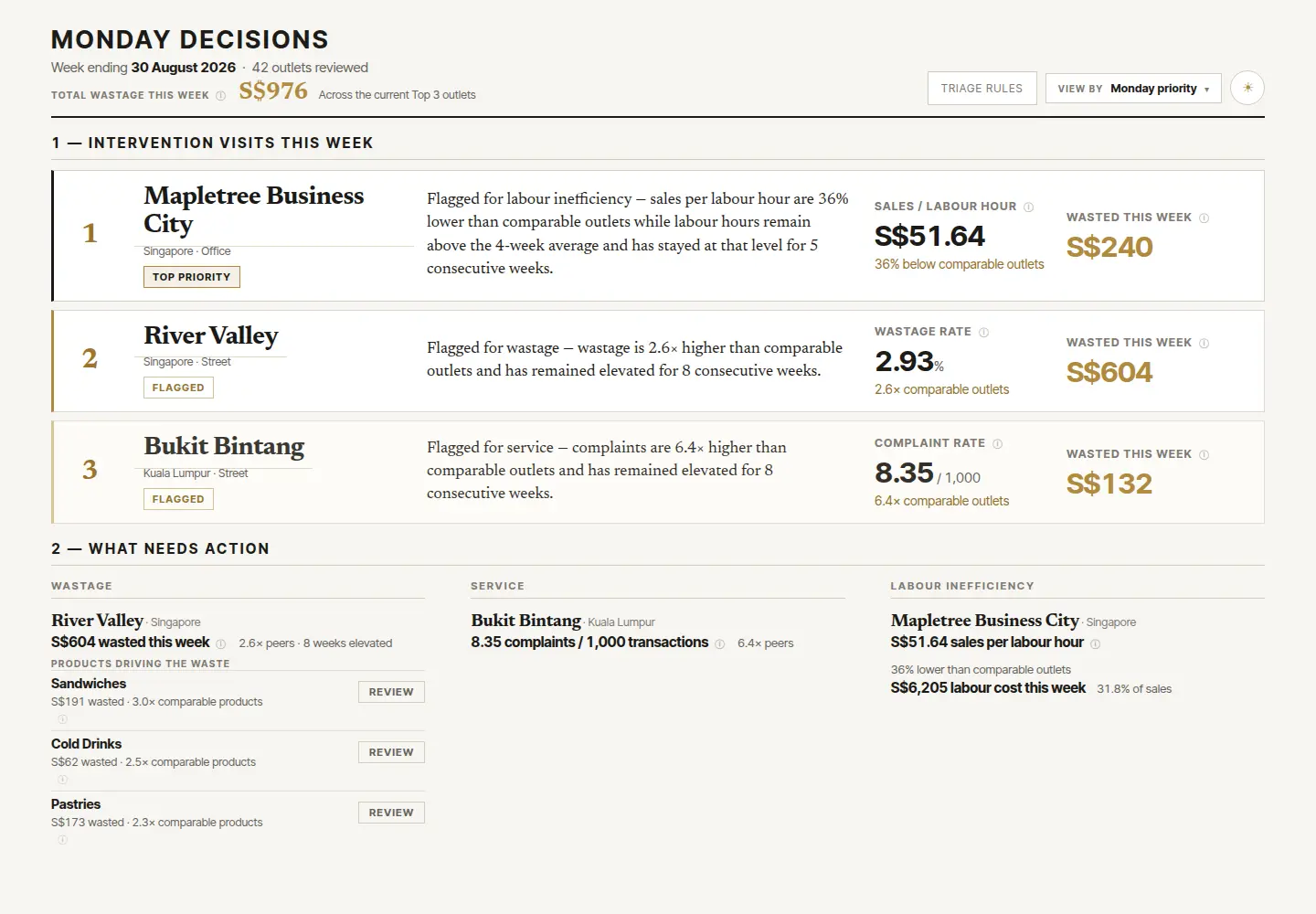
Three outlets. One Monday decision.
Make a choice inside a real constraint.
An academic case study · evidence, rules, and personal contribution.Follow this thread↗
The cost of a stop.
Trade position for pace. Test the assumptions.
A sourced race study · an illustrative strategy experiment.Follow this thread↗
Prepared, still uncertain.
Explore where preparation meets probability.
A real Skyfrond fishing story · an illustrative probability lab.Follow this thread↗Connections / Across the boundaries
Different arenas. Connected questions.
An editorial map of the published stories. Select an idea to connect a work case, race strategy and chance in a game. A line suggests a reading connection, not an identical mechanism.
CURRENT LENS
Constraints
A limit changes which choices are actually available. Start with the feasible set before looking for the most attractive answer.
Link to this concept ↗Three outlets. One Monday decision.
One bounded Monday decision, rather than an unlimited wish list.
Open the relevant passage ↗02 / FORMULA 1The cost of a stop.
A tyre advantage has to repay a stop before the laps run out.
Open the relevant passage ↗03 / GAMINGPrepared, still uncertain.
Preparation still has to meet the right opportunity window.
Open the relevant passage ↗Enable JavaScript to switch the map. Every concept and reading link is also available below.
Evidence
Separate an observation from an interpretation and a model. Each can be useful, but they support different kinds of conclusions.
Uncertainty
A plausible outcome is not a guarantee. Distinguish randomness in an attempt from uncertainty about the assumptions you chose.
Trade-offs
Improving one thing can cost another. Make the exchange visible before treating a choice as an improvement.
Iteration
A useful next attempt changes something for a reason. Keep the observation that led to the change, not just the latest result.
Model boundaries
A model answers the question it represents. State what it leaves out before carrying its result into a real decision.
Reading trails / Three stops. Three lenses.
Start with one question.
Two editorial routes, linked directly to the relevant passages. The order is a suggestion; begin at any stop.
01 / EVIDENCE
What counts as proof?
Start with evidence, then examine what it cannot prove.
02 / UNCERTAINTY
Can preparation guarantee success?
Move from random outcomes to decisions under changing assumptions.
CROSS-PILLAR ROUTES / 10 ROUTES, 30 STOPS
Read across the boundaries.
Start with a question and follow it through original material, case studies and interactive tools. Each stop offers something to inspect; after three stops, put your own judgement into words.
01 / THREE-STOP ROUTEWhat changed besides the price?
Read a classroom reflection, compare two complete offers, then return to a conversation in Bugis.Open the guide & workbook+
01 / Work & learning
A strong fallback. A narrower conversation.
Read the El-Tek team reflection, keeping price and restrictions in view together.
When did the conversation become narrower, and which question might have helped?
Separate having a strong fallback from knowing the other side’s priorities.
Begin with the classroom reflection →02 / Work & learning
More than a price
Inspect A and B in the offer studio, then change one term or the client’s priorities.
Which complete offer meets both floors, and what assumption changes the comparison?
Keep a settings link or text summary beside your next question.
Put complete packages side by side →03 / Life & notes
S$25 to S$20. What changed besides the price?
Read the Bugis account and follow the change from one bag to two.
What entered the proposal besides a different price?
Compare the concrete exchange with the fictional exercise, keeping their different settings clear.
Return to the Bugis story →
After three stops, make the answer your own.
Which priority would you verify before presenting two complete offers?
Notes stay in this tab’s session so you can return and continue. They are not sent with a link or included in account or workspace backups. Export a file to keep them.
02 / THREE-STOP ROUTEGive curiosity something to do.
Read a brand’s first encounter, try a small game, then revisit the invitation inside a prototype.Open the guide & workbook+
01 / Work & learning
From grid to bricks
Read the F1 × LEGO argument and switch between play, building and collecting in the participation studio.
What is the first thing a newcomer can do before learning all the rules?
Keep the immediate activity separate from the later behaviour you would want to observe.
Inspect three ways into a brand →02 / Play & tools
Start Sequence
Read the rules, then try a round of Start Sequence. Notice what makes the first action understandable.
Which instruction do you need before starting, and which detail becomes useful after a result?
Compare the invitation to act with the explanation that follows.
Try a first action yourself →03 / 01 / WORK
Three outlets. One Monday decision.
Return to the Kopi case and its original prototype. Follow the first meeting question into a screen and a decision.
Does the first visible action help the user answer the question they arrived with?
Carry the difference between a clear first action and a supported decision into your own design.
Return to the original interface →
After three stops, make the answer your own.
Choose a tool or experience. Write its first action, the understanding it requires and one later behaviour worth observing. Explain what would make the first encounter worthwhile on its own.
Notes stay in this tab’s session so you can return and continue. They are not sent with a link or included in account or workspace backups. Export a file to keep them.
03 / THREE-STOP ROUTEKeep the conditions beside the choice.
Compare a pit-wall call, change a delivery sequence, then revisit two familiar cities.Open the guide & workbook+
01 / Formula 1
The multi-scenario pit wall
Keep one strategy fixed while changing the selected conditions. Compare the outcomes in each condition with the plan’s maximum regret.
Does the recommendation change because the plan improved, or because a different future is now being considered?
Carry the assumptions into the next comparison before carrying the winning plan.
Compare three futures →02 / Work & learning
Service, scope & cost
Follow one task through its predecessors, available crew and completion time. Then change only the crew capacity.
Which wait would remain with more people, and which wait comes from the crew already being occupied?
Separate a dependency from a resource shortage; they call for different changes.
Inspect the delivery sequence →03 / Life & notes
One moment, different ordinary days.
Read the note beside the cities and time zones it names. The same instant can belong to very different ordinary days.
What does aligning the clocks help compare, and what remains particular to each place?
Return from the model to the situation in which someone will use the result.
Return to ordinary days →
After three stops, make the answer your own.
Choose one recommendation from the route. Write the condition that would make you reconsider it, and the observation you would need first.
Notes stay in this tab’s session so you can return and continue. They are not sent with a link or included in account or workspace backups. Export a file to keep them.
04 / THREE-STOP ROUTELeave the next person a useful starting point.
Read a handoff reflection, inspect requirements, then revisit a school project’s life cycle.Open the guide & workbook+
01 / Life & notes
What does the next person need?
Look for the information the next person needs, rather than only the work the previous person finished.
Could someone continue from this handoff without asking for the whole conversation again?
Take a concrete missing detail into the requirements case.
Start with a personal question →02 / Work & learning
Requirements to acceptance
Follow one requirement through its field, rule, interface and acceptance example. Keep the version consistent.
Which observable check would show that two people understood this request in the same way?
A shared check is more useful to the next team than a reassuring label such as complete.
Inspect the acceptance examples →03 / Work & learning
Designing a school as a system.
Read the individual plan alongside the team reports, then look at the questions about operation and maintenance.
Who would keep a design usable after the project team moves on, and what information would that role need?
Extend the handoff beyond the next deliverable to the life of the proposed system.
Follow the life-cycle material →
After three stops, make the answer your own.
Draft a five-line handoff: current version, current state, next owner, next action and the evidence needed to close it.
Notes stay in this tab’s session so you can return and continue. They are not sent with a link or included in account or workspace backups. Export a file to keep them.
05 / THREE-STOP ROUTEFrom a choice to its evidence.
Try the Kopi episode, inspect the submitted case, then compare how a rule changes an outcome.Open the guide & workbook+
01 / Play & tools
Kopi Decision Theatre
Make a first call before opening the review. Notice which sample actually changes your mind.
What would you choose with the evidence currently on the table, and what are you still assuming?
Keep your first reason so you can compare it with the original submission.
Make your first call →02 / 01 / WORK
Three outlets. One Monday decision.
Compare the submitted prototype with the case explanation. Follow one recommendation back to its displayed inputs.
Which part of your initial reason is supported by the artifact, and which part needs another source?
Separate what the screen displays from the operational decision someone might make from it.
Return to the group artifact →03 / Work & learning
Requirements to acceptance
Run the same acceptance situations under both rule versions. Inspect the cases that change and those that stay the same.
Would you still explain the outcome in the same way if only the threshold or permission rule changed?
A revised judgement becomes clearer when the changed condition is visible.
Compare two versions of a rule →
After three stops, make the answer your own.
Write your initial call, the evidence that mattered most, and one sentence explaining whether you would revise the call.
Notes stay in this tab’s session so you can return and continue. They are not sent with a link or included in account or workspace backups. Export a file to keep them.
06 / THREE-STOP ROUTEA city, from the pavement to a model.
Begin with a walk, revisit the design of a greenway, then compare the conditions around two cities.Open the guide & workbook+
01 / Life & notes
A city, one walk at a time.
Start with an ordinary walking day. Look for the practical detail that makes a route attractive or awkward.
What would you want to know before choosing where and when to walk?
Turn one everyday preference into something a design comparison could examine.
Start with an ordinary walk →02 / Project fieldbook
A greenway as a system
Read how the greenway work frames demand and design. Keep generated inputs distinct from on-site observations.
Which recommendation would change most if a generated assumption proved wrong?
Name the field observation that would most improve the comparison.
Ask how a greenway is evaluated →03 / Play & tools
City observatory
Choose two cities, align the instant, then inspect the forecast timestamp, time zone and remaining daylight.
Are you comparing the same moment, the same local hour, or two different things?
Use the comparison to form a question for an actual outing; keep forecast and observation distinct.
Compare another city →
After three stops, make the answer your own.
Propose one walking route. List the practical question, the forecast you would check and the observation you would make once outside.
Notes stay in this tab’s session so you can return and continue. They are not sent with a link or included in account or workspace backups. Export a file to keep them.
07 / THREE-STOP ROUTEA request becomes an interface.
Follow a prototype into working rules, then return to the details that make a site comfortable to use.Open the guide & workbook+
01 / Project fieldbook
Requirements become a first interface
Follow the account of the Siemens role from a customer request to an interface prototype and product statement.
Which part of the request needs to remain recognisable when it becomes a screen?
Choose one request to follow across the next case.
An early interface at Siemens →02 / Work & learning
Requirements to acceptance
Trace the request through its rules and acceptance situations. Inspect a changed rule beside the previous version.
Can a reviewer identify both the intended behaviour and the version being checked?
Bring a specific acceptance check into the question of everyday use.
Requirements and acceptance →03 / Life & notes
The details I keep coming back to.
Read the small details of repeated use: language, theme, labels and how a person returns to something familiar.
Which small friction would become much more noticeable on the tenth visit?
Treat repeat use as another design situation worth checking.
The details of repeated use →
After three stops, make the answer your own.
Choose one interface control. Describe the intended behaviour, a boundary case and how you would make its meaning clear in both languages.
Notes stay in this tab’s session so you can return and continue. They are not sent with a link or included in account or workspace backups. Export a file to keep them.
08 / THREE-STOP ROUTEKeep the number and its context together.
A grey sky, a virtualisation estimate and a telemetry trace each invite a different kind of question.Open the guide & workbook+
01 / Life & notes
A grey sky, and a longer question.
Begin with the grey sky and the questions it led to. Identify the measurement before interpreting its meaning.
What are the indicator, unit and time period behind the number you are looking at?
Keep those three details beside the next comparison.
A question about air →02 / Project fieldbook
A virtual environment that can be tested
Read the estimated benefits in the Honeywell role beside the proposed comparison plan. Look for workload and baseline.
What would have to stay comparable before you could interpret a difference as an improvement?
Separate an estimate worth testing from a measured result.
Read the baseline behind an estimate →03 / Formula 1
Race & lap explorer
Choose two included laps and inspect their alignment, sampling and sector times before reading individual peaks.
Does a visible gap come from the driver trace, the alignment choice or missing samples?
A trace is easier to interpret when its measurement conditions remain visible.
Inspect an observed lap →
After three stops, make the answer your own.
Pick a number from the route. Write its source, unit, time period, comparison baseline and the next question it can support.
Notes stay in this tab’s session so you can return and continue. They are not sent with a link or included in account or workspace backups. Export a file to keep them.
09 / THREE-STOP ROUTEGive the next pull a useful question.
From my physical-ranged profile to a party’s preparation, then back to one thing worth practising.Open the guide & workbook+
01 / Gaming
Raiding & FFLogs
Read the physical-ranged profile, then use the linked FFLogs record to choose a particular encounter and expansion.
Which moment would you review first, and what context would you need before judging a result?
Take one question about execution into the party-preparation desk.
Meet the player and the record →02 / Gaming
Heavyweight raid desk
Choose an encounter and compare the linked CN guide with the party’s stated variant, role and positions.
Which agreement needs confirming before the first pull, even when everyone has read a guide?
Turn a vague instruction to know the fight into a named mechanic, assignment or recovery question.
Check the party’s agreements →03 / Life & notes
A better question for the next pull.
Return to the note about the next pull. Look for a small change that can actually be observed in the next attempt.
What would count as improvement even if the next pull still does not clear?
Keep the practice question small enough to review after one attempt.
Choose the next practice question →
After three stops, make the answer your own.
Choose one mechanic: write the party agreement, your role, a recovery question and the thing you would inspect after the next pull.
Notes stay in this tab’s session so you can return and continue. They are not sent with a link or included in account or workspace backups. Export a file to keep them.
010 / THREE-STOP ROUTEAn open window is a chance to begin.
Read a catch, plan the next fishing session, then compare how a delivery plan handles preparation and waiting.Open the guide & workbook+
01 / 03 / GAMING
Prepared, still uncertain.
Read the preparation behind the Skyfrond catch as well as the final cast. Notice how a chance to attempt differs from a guaranteed result.
Which parts could preparation improve, and which part still depended on the bite?
Separate becoming ready from obtaining the outcome.
Read the Skyfrond catch →02 / Gaming
Legendary fish watch
Pick timed targets in the session planner. Leave room for preparation, travel and the duration of an attempt.
Does the itinerary give enough room to attempt each target, or only place its opening time on a list?
A useful plan has to reserve the work around an opportunity, too.
Plan around the next windows →03 / Work & learning
Service, scope & cost
In the delivery case, inspect predecessors and finite crews. Compare a task waiting for a crew with a fish waiting for its window.
Which scheduling idea carries across, and why would a completed task still differ from a fishing attempt?
Keep the useful scheduling connection while preserving the different meaning of success.
Compare another kind of schedule →
After three stops, make the answer your own.
Sketch one session with preparation, travel and attempt time. Mark which end times are planned and which outcomes remain uncertain.
Notes stay in this tab’s session so you can return and continue. They are not sent with a link or included in account or workspace backups. Export a file to keep them.
Your collection / Return to a question
Keep a question for later.
Save cases, field notes, tools and project entries in this browser. Start with three recommendations and your saved items, or reveal the whole collection.
Enable JavaScript to save; articles remain available.
Try a question / Two experiments
Change an assumption. Watch the outcome move.
Both experiments expose their assumptions and boundaries, so the feedback is something you can reason about.